
What it does
- Dangerous attachments are quarantined. Executables, scripts, and files that hide a program behind a document name (like
invoice.pdf.exe) never appear as normal attachments. The ticket is still created and the rest of the message is untouched. - Disguised links are disabled or need a confirmation. A link that looks like
Scan_2026.pdfbut leads to an executable cannot be clicked. - Affected tickets are flagged as suspicious. Filter by Suspicious to review them before anyone opens them.
- Every override is logged. Downloading a quarantined file or opening a flagged link is recorded with the agent, ticket, and time.
Quarantined attachments
Chatarmin CX inspects the real content of every incoming email attachment, not just its name. Files are held in quarantine when they are:- programs, disk images, or Windows shortcuts, detected by their content regardless of the file name
- named with an executable or script extension such as
invoice.pdf.exe,.bat,.vbs,.js,.ps1,.msi,.lnk,.iso, or.jar, even if the content looks harmless - HTML, SVG, or JavaScript files, because they can run code in the browser
What the team sees
A quarantined file is stored separately from the conversation. It has no preview, it is not included in Download all, and AI Agents cannot read it.- The conversation shows a note: Attachment
filenamewas quarantined for security. - The attachments section in the ticket sidebar shows a red Quarantined group with the file name and the reason.

Download a quarantined file
Only download a quarantined file when you have confirmed with the sender, through another channel, that they really sent it.1
Open the ticket
Open the ticket in the Inbox and expand the attachments section in the sidebar.
2
Choose the file
Hover over the file in the Quarantined group and click the download icon.
3
Confirm the warning
The dialog Download quarantined file? explains why the file was blocked. Click Download anyway to save it to your computer.
Contact forms
File uploads on contact forms run through the same check. A dangerous file is rejected while the visitor is still on the form, so they can choose a different file. Nothing is quarantined in that case.Attachment checks currently cover incoming email and contact-form uploads. Files that arrive through other channels are stored as before.
Disguised links
Attackers often show a link as a document while it leads to a program. Chatarmin CX compares the link text with the real target on every message it displays, including older messages. A link is flagged when its text ends in a document, image, or archive extension such as.pdf, .docx, .jpg, or .zip, while the real address ends in a different extension.
A message with at least one flagged link shows the banner This message contains links that may be deceptive above the content.

Suspicious tickets
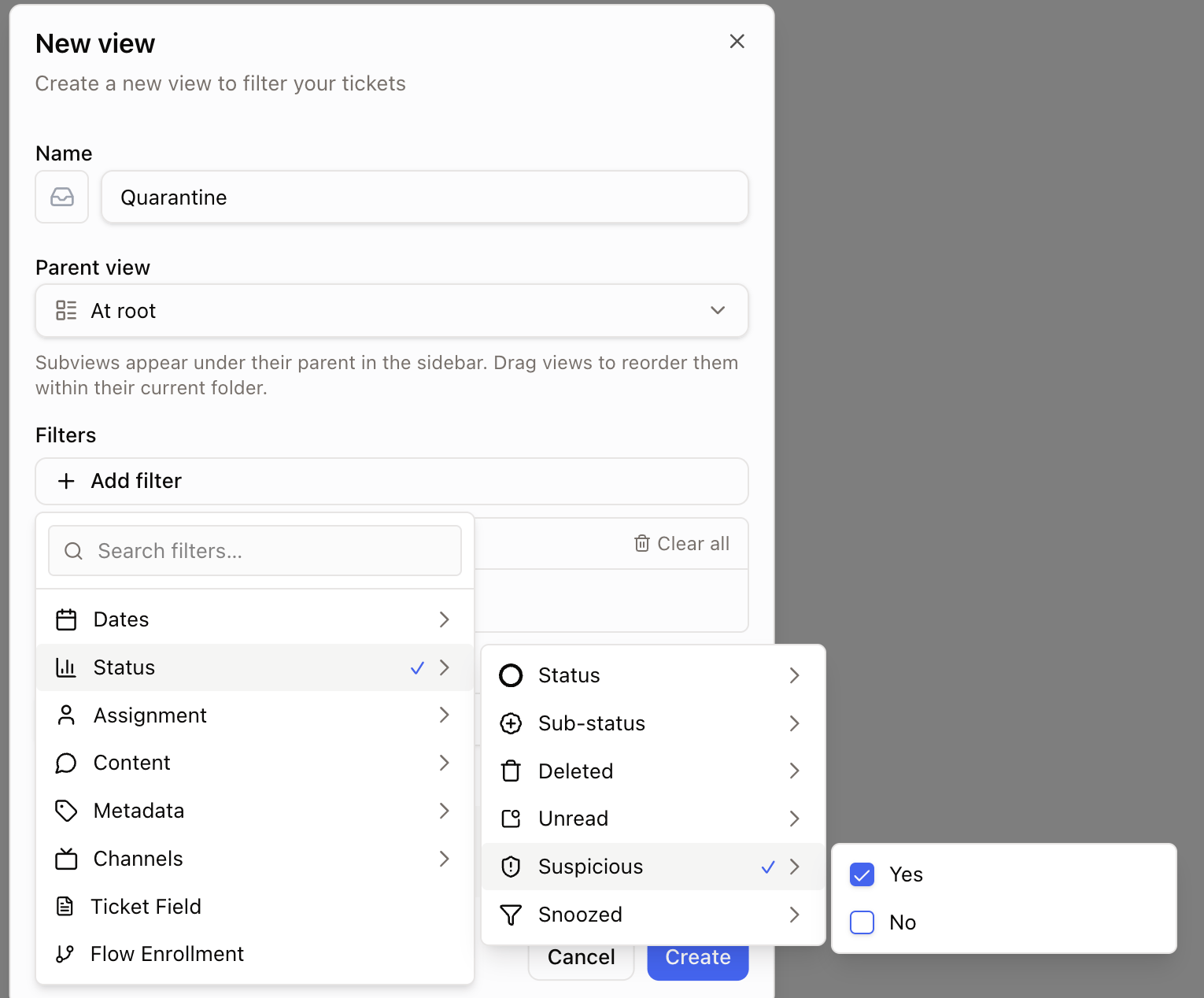
When an email arrives with a quarantined attachment or a disguised link, the ticket is marked Suspicious. Flagged tickets still appear in your normal views — the flag does not hide or move them — so use it to review them before anyone opens them.- Filter. Add the Suspicious filter to the inbox or any saved view to see only flagged tickets. See Views and filters.
- Save a Quarantine view. Filter by Suspicious, then save it as a shared view named “Quarantine” so your team triages flagged tickets in one place before opening them.
- Rules. Use the Suspicious condition in Rules, for example to tag the ticket or assign it to whoever handles security.
Security log
Chatarmin CX records who downloaded a quarantined file and who confirmed opening a flagged link, together with the ticket, the file or address, and the time. The log is not shown in the app. Contact Chatarmin support to receive the entries for your workspace.Best practices
- Review suspicious tickets daily — filter by Suspicious, or save a Quarantine view — and resolve the ones that are clearly phishing.
- Before you click Download anyway or Open anyway, confirm with the sender by phone or a known address. A genuine customer account can be hijacked and used to send lures.
- Tell customers to send scans as PDF or images. Those pass without friction, while HTML files or shortcuts are always quarantined.
- If an agent confirmed a lure by mistake, change their password immediately and contact Chatarmin support with the ticket number.