
Prerequisites
You need Shopify admin access for the store and permission to authorize the requested provider access. Order writes require Shopify access such aswrite_orders; marketplace-order setups can also require write_marketplace_orders when applicable. Confirm the store’s cancellation, refund, notification, inventory, and fulfillment rules before enabling writes.
Set it up
1
Open integrations
Open integrations and choose Shopify.
2
Connect the store
Click Connect, enter the store’s
myshopify.com admin domain, review the requested provider access, and authorize the connection.3
Verify the store
Open a known order in a ticket and confirm that the store, customer, currency, fulfillment state, and line items are correct.
Use Shopify in the inbox
When a ticket contact matches a Shopify customer or order, the Shopify widget appears in the ticket sidebar. Inbox users can view the order and run available order actions.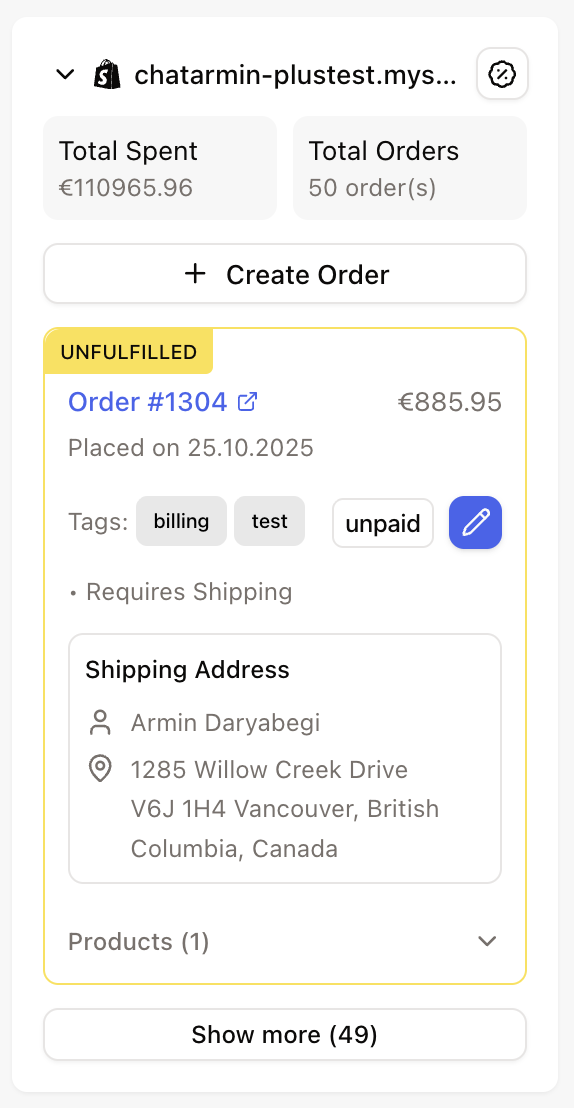
AI Agent actions
Connect Shopify, then open AI Agents, enable the required actions, and select the stores each agent may use. Actions can retrieve Shopify data and create or change customers, orders, discounts, refunds, notes, tags, line items, fulfillment, and shipping addresses. Cancel order, Cancel & refund order, and Create refund default to Ask every time. AI Agent test runs simulate these consequential actions and do not change Shopify. Review the approval mode of every other Shopify write action before enabling it.Cancel and refund actions
Cancel order
Cancel order can cancel with or without a refund. For a CX AI Agent,refund, notifyCustomer, and restock all default to true. Unless the agent explicitly proposes otherwise, Shopify refunds the order, sends its official cancellation email, and returns items to inventory.
These defaults differ from the inbox’s plain cancel flow, where refund, notification, and restock default to false. Always review the selected options instead of assuming both surfaces behave alike.
The Shopify notification is separate from any message sent by the AI Agent in cx.
Cancel & refund order
Cancel & refund order always cancels and fully refunds. Use it only when cancellation and full refund must happen together. For a partial refund without cancellation, use Create refund. Do not enable both cancel actions on one agent unless its instructions clearly define which one to use.Safe testing
- Use a clearly identified test order that has not been fulfilled.
- Run the AI Agent in test mode and review the simulated action.
- Check the order ID and all refund, notification, restock, and reason values.
- Verify that ERP and warehouse systems will not duplicate or reverse the action.
- Approve the first live action manually and confirm the result in Shopify and the ticket note.