Inbox & Views
What you need to know about the inbox this
Intro-Disclaimer: Make sure you mastered introduction before going into such greater detail!
2min Video on “Views & Subviews”:
About Views & Subviews
The inbox is a frontend-display-feature that enables you to set default views based on your company’s needs:
teams
brands
shops
languages
… on whatever base you want operations to seamlessly oversight what’s going on, views lets you
conglomerate the channels needed, in one “master-inbox-view”
decentralize ticketing analytics based on segmented views introduced above
assign admin-rights based on your company’s infrastructure
..watch the video above (2min) to understand the inbox and get going!
Subviews
You can easily create Subviews, by:
1.
Click on "Add View"
Click on ”+ Add View” in the Inbox\

2.
Create Subview
Next, you select the Parent Views and type the Subviews’ Name. Like this:
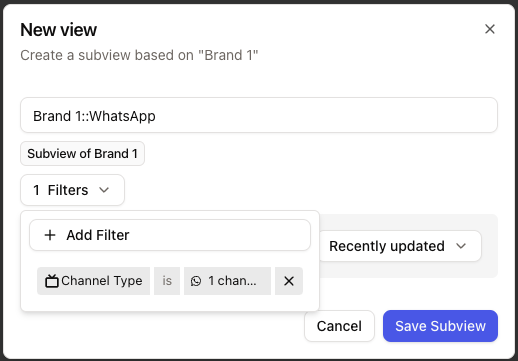
Here you will see, that it initially takes the Filters from the Parent View. You can directly change & set the desired Filters for the Subview. Those changes will NOT reflect/change any filters from the Parent View and will be overwriting the Parent’s filters.
So the Subview will show the Tickets ONLY by the Filters set in the Subview, not by the ones set in the Parent view AND Sub-view