Side Conversations
Start internal email threads linked to any ticket. Loop in teammates, suppliers, or third parties directly from your inbox.
What are Side Conversations?
Side Conversations let you start a separate email conversation that stays linked to an existing ticket. This is useful when you need internal alignment on a customer issue, want to loop in a supplier, or need input from another team before responding to the customer.
The side conversation creates its own ticket while keeping a clear link back to the original (parent) ticket. Both tickets reference each other, so your team always has full context.
How to create a Side Conversation
1
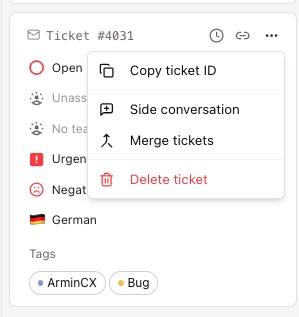
Open a ticket in your ArminCX Inbox. On the right side, you see the Ticket Information panel. Click the three-dot menu at the top right corner of the ticket details.
2
Select "Side conversation" from the dropdown. A dialog opens where you can configure your side conversation.
3
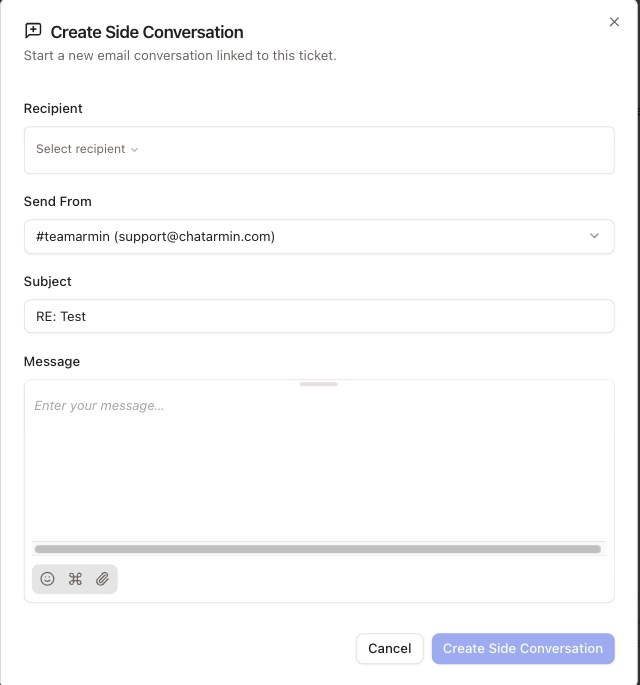
Fill in the details of your side conversation:
Recipient: Choose who you want to reach out to. This can be an internal team member, a supplier, or any email address.
Send From: Select the email address and team the conversation should be sent from.
Subject: The subject line is pre-filled with "RE:" followed by the original ticket subject. You can edit it as needed.
Message: Write your message. You can also attach files using the attachment icon.
4
Click "Create Side Conversation" to send. ArminCX creates a new linked ticket for this conversation.
How linked tickets work
Once you create a side conversation, ArminCX generates a new ticket. This ticket is linked to the original (parent) ticket in both directions.
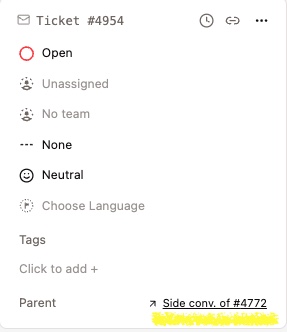
On the new ticket (side conversation): The Ticket Information panel shows a "Parent" field with a direct link to the original ticket.
On the original ticket (parent): A "Side Conversations" section appears at the bottom of the Ticket Information panel. It lists all side conversations with their ticket number, timestamp, subject, and status.
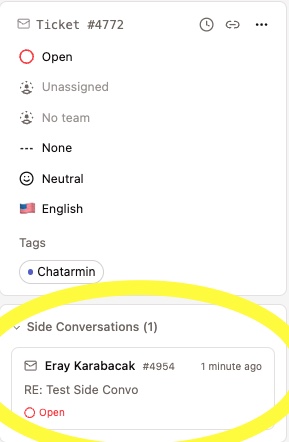
Click on any linked reference to jump directly to the related ticket.
Good to know: Side conversation tickets live inside their parent ticket. They don't show up as standalone tickets in your usual inboxes, so the only way to reach them is through the parent ticket they're linked to. If your team runs a lot of internal communication, keep an eye on your open side conversations so they don't get lost, and make sure your inbox setup keeps the parent tickets visible to the people who need to follow up.
When to use Side Conversations
Side Conversations are built for situations where you need external or internal input before resolving a customer issue. A few common examples: clarifying order details with a fulfillment partner, checking product specs with your product team, getting approval from a manager on a refund, or coordinating with a logistics provider on a delayed shipment.
Good to know: The customer does not see the side conversation. It stays separate from the main ticket thread. Only your team and the recipient of the side conversation have access to it.
When NOT to use Side Conversations
Side Conversations exist to loop in people outside ArminCX, meaning third parties who need to join a ticket-related discussion. Think warehouse staff (Lagermitarbeiter), suppliers, or colleagues from internal sales (Innendienst).
They are not the right tool for collaboration between ArminCX team members. For internal teamwork, two other features do the job better:
Reassignment, when you want to hand the ticket to a colleague to take over.
Internal notes, when you want to add context or ask a teammate something without leaving the ticket.
Keeping internal back and forth in notes and reassignments means everything stays on the original ticket, with full context in one place. The key is a well structured inbox, so every team member can work efficiently and stays in the loop.