
Reviews.io
Manage Feedback Directly in Your Inbox
Transform customer feedback into actionable conversations. By connecting Reviews.io with your armincx Inbox, you can centralize your reputation management and respond to customer reviews without ever switching platforms.
🚨 Reviews.io Subscription Requirement > This integration requires a Reviews.io Plus Plan.
Why? Reviews.io restricts API access to their highest tier. If you are on a lower plan, API credentials will not be available in your dashboard. We are currently working on a marketplace-listed app to make this integration available to all tiers in the future.
Key Features & Benefits
Real-Time Review Sync: Every new review, automatically generates a ticket in your ArminCX Inbox.
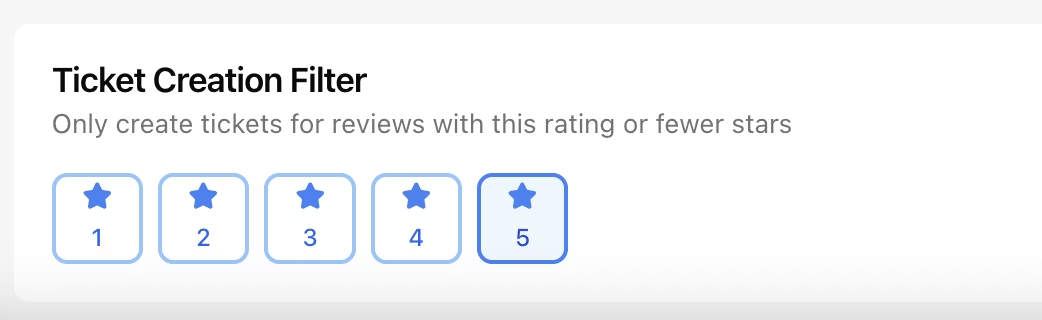
Selective Ticket Creation (Filtering): Choose which reviews require your attention. You can configure the integration to only create tickets for specific star ratings (e.g., only 1 and 2-star ratings for immediate crisis management).
Full Two-Way Communication: Unlike basic integrations, you can reply to reviews directly from your inbox. Your response is pushed back to the review platform automatically.
Unified Customer History: See a customer’s review history alongside their chat and email interactions, giving your agents full context before they hit "reply."
How to Connect REVIEWS.io
Setting up the integration is a straightforward process. To ensure full functionality (receiving and replying), you will need four pieces of information.
1. Find your Credentials
Log into your REVIEWS.io Dashboard.
Navigate to Account Settings > Integrations.
Locate your API Key and Store Key in the integration settings.
Have your Dashboard Email and Password ready (the same ones you use to log in to REVIEWS.io).
Important Note: While the API and Store Keys allow us to receive reviews, your Dashboard Credentials are strictly required to post replies. Without these, you will only be able to view incoming feedback but won't be able to respond via ChatArmin.
2. Authorize in ArminCX
In your ArminCX account, go to Settings > Integrations > REVIEWS.io.
Enter your API Key and Store Key.
Enter your Dashboard Email and Password.
Click Connect.
DONE!

3. Configure Sync Rules
Once connected, toggle the "Create Tickets" switch. Define your filtering rules to match your workflow:
Example: Select only 1, 2, and 3 stars if you want your team to focus solely on neutral and negative feedback to improve your rating.
Maximizing Efficiency with "Review Views"
To keep your inbox organized, we recommend setting up a dedicated Custom View:
Filter by Source: Create a view where
Ticket SourceisREVIEWS.io.Prioritize by Rating: Use automated rules to tag and highlight "Urgent" tickets for any 1-star review.
Close the Loop: Respond directly in the ticket. Your message will be synced as an official reply to the customer's review on the original platform.