weclapp
See all your weclapp data in ArminCX
Bring your ERP data directly into your customer support. By connecting weclapp to ArminCX, you bridge the gap between order management and communication. This integration allows your team to access real-time order statuses without ever leaving the inbox, significantly reducing response times and manual data entry.
Setting up the integration
1. Go to integrations
Navigate to the Integrations page (click on your name/profile icon in the bottom left corner and choose Integrations) and select weclapp from the list of available apps.
2. Connection & Authorization
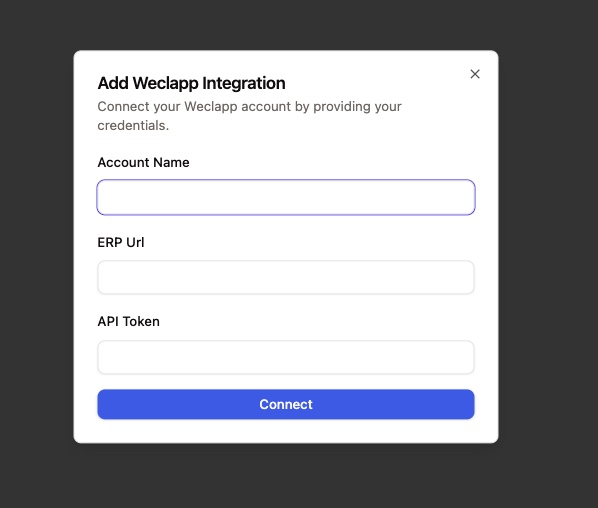
Click on Connect -> Add account. To establish the connection, you will need to provide:
Account Name
Your weclapp URL: (e.g.,https://your-company.weclapp.com)API Token: You can find or generate this in your weclapp user settings under "API Token".
Click Connect to grant ArminCX the required permissions to sync data.
How to use
Once connected, the weclapp integration enhances several areas of your ArminCX workspace.
Inbox Widget
Information siloed in your ERP is now visible where you need it most. For every ticket in your inbox where a customer can be identified (via email address), a weclapp widget will appear on the right-hand side.
Real-time Insights: View the most recent orders associated with the customer.
Status Tracking: Check if an order is "In Process," "Shipped," instantly.
Quick Links: Jump directly to the specific record in weclapp with one click.
Workflows & Automation
Automate repetitive manual tasks by using weclapp actions within your ArminCX Workflows. This ensures your ERP stays updated based on customer interactions.
Available actions:
Get Order: Retrieve full order details (items, shipping address, total) to use as variables in your replies.
Get Invoice: Check payment status or pull invoice numbers to answer billing queries automatically.
Create Delivery Note: Trigger the creation of a delivery note directly from a support workflow once a request is validated.