PayPal Disputes
Connect PayPal Disputes
Short description
The PayPal Disputes integration lets your support team view and manage PayPal disputes directly from the armincx inbox, without switching to the PayPal Resolution Center.
When to use this
When your team needs to see and act on PayPal disputes without leaving armincx.
Prerequisites
PayPal Business account
PayPal App created in the PayPal Developer Dashboard
"Customer Disputes" enabled in the app (see below)
Client ID and Secret Key from the app
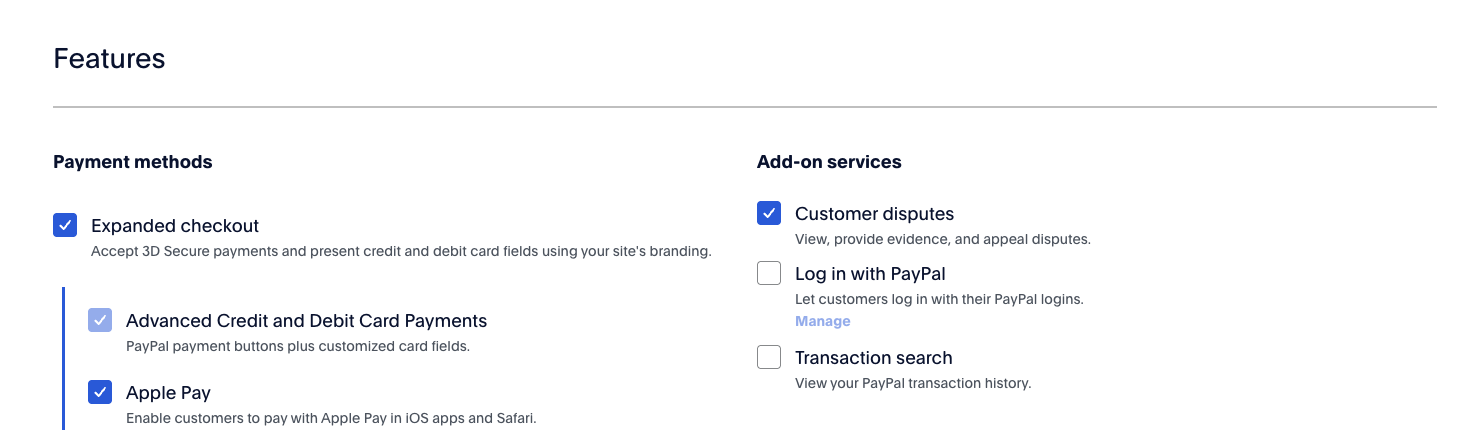
Enable Customer Disputes:
Open the PayPal Developer Dashboard
Select your App
Under Features, check "Customer Disputes"
Save
Steps
In armincx, go to Settings > Connect
Click Add Account
Give the connection a name
Use your Live credentials, not Sandbox
Enter your Client ID and Secret Key
Click Connect
Notes
A PayPal Disputes section appears automatically on a ticket when the customer has open disputes.
All actions from the PayPal Resolution Center are also available directly in armincx.
The dispute status in the inbox may lag by up to 3 hours. Always open the dispute directly for the live status - that view is always up to date.