AI Analytics Dashboard
The AI Analytics page shows how AI and automation are performing in your support workflow. Use it to understand automation rates, how agents interact with AI suggestions, what customers are asking about, and how your workflows are performing.
Hero Metrics
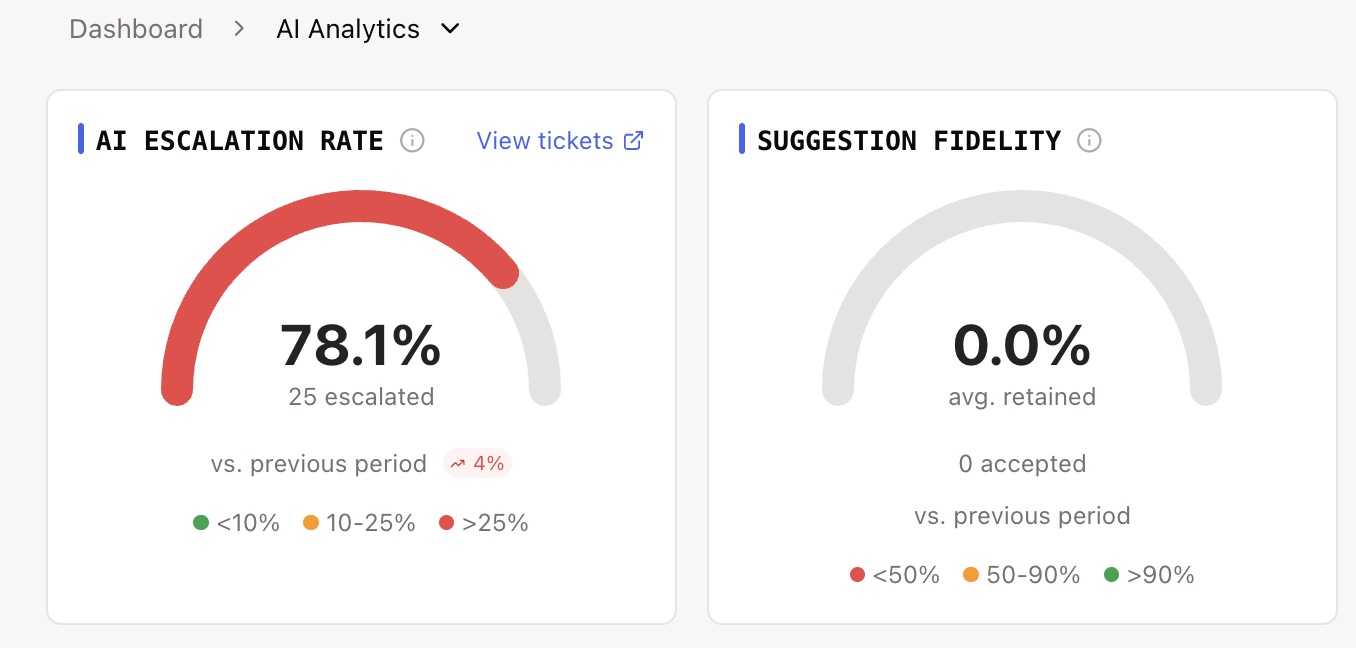
At the top of the page, two key metrics summarize AI performance at a glance.
AI Escalation Rate
What it shows | The percentage of AI-involved tickets that were escalated to a human agent |
How it's calculated | (AI Escalated Tickets / AI Involved Tickets) x 100 |
Trend | Compared to the previous period |
A lower escalation rate means AI is handling more conversations without needing human help.
Suggestion Fidelity
What it shows | How closely agents follow AI-suggested responses |
How it's calculated | Average similarity score between the AI suggestion text and the final message the agent actually sent |
Scale | 0% = completely rewritten, 100% = sent exactly as suggested |
Trend | Compared to the previous period |
A high fidelity score means agents trust the AI suggestions and send them with little or no editing.
Automation Breakdown
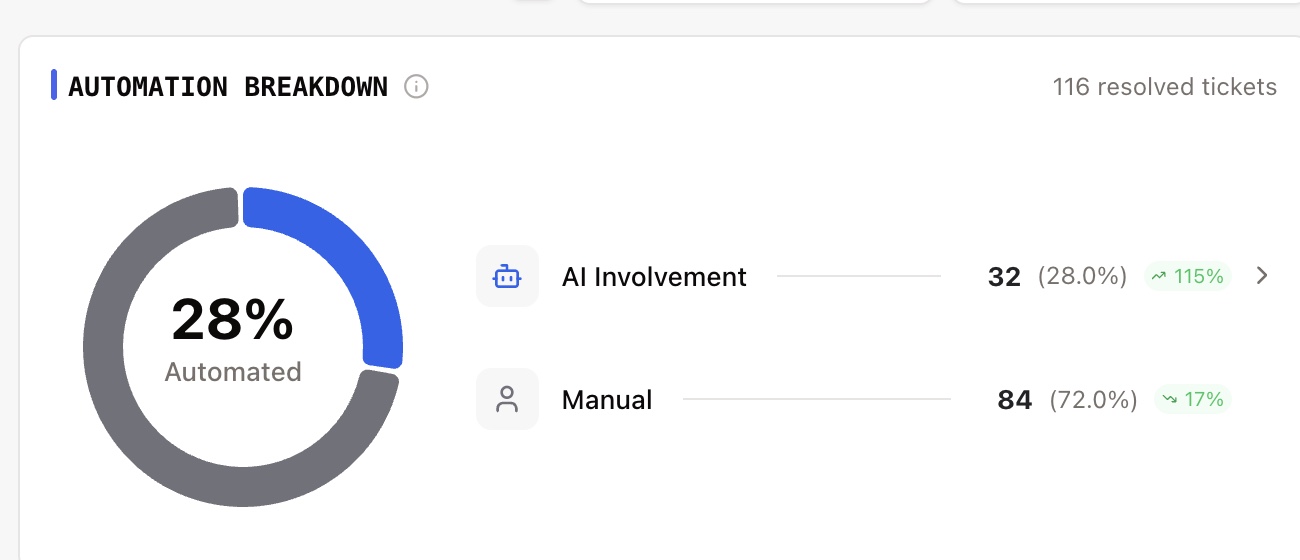
This section shows how your resolved tickets break down by resolution method:
Category | What it means |
|---|---|
AI Involvement | Tickets where AI generated suggestions or sent messages. The ticket must be resolved. Excludes tickets handled solely by a workflow. |
Workflow Automation | Tickets that were fully resolved by an automated workflow, with no human agent involvement. |
Manual | Tickets resolved entirely by human agents, with no AI or workflow involvement. |
Each category shows the count, percentage of total resolved tickets, and a trend comparison.
Suggestion Acceptance Rate vs. Suggestion Fidelity
These two metrics measure different things about AI suggestion adoption. They are easy to confuse, so here is the distinction:
Metric | What it measures | How it's calculated |
|---|---|---|
Acceptance Rate | How often agents use AI suggestions at all (binary: used or not used) | (Suggestions used / Suggestions offered) x 100 |
Fidelity Score | Of the suggestions that were accepted, how much of the original text was kept | Average text similarity between AI suggestion and the final sent message |
Example: If 100 suggestions are offered to agents and 40 are accepted (agent presses Tab), the Acceptance Rate is 40%. If those 40 accepted suggestions had an average text similarity of 85% to the final messages sent, the Fidelity Score is 85%.
How Fidelity is scored: The similarity between the AI suggestion and the final sent message is calculated using word-level comparison. The text is split into individual words, and the score represents the overlap between the suggestion words and the final message words. A score of 100% means the message was sent exactly as suggested. Lower scores indicate the agent edited or rewrote portions before sending.
Automation Funnel
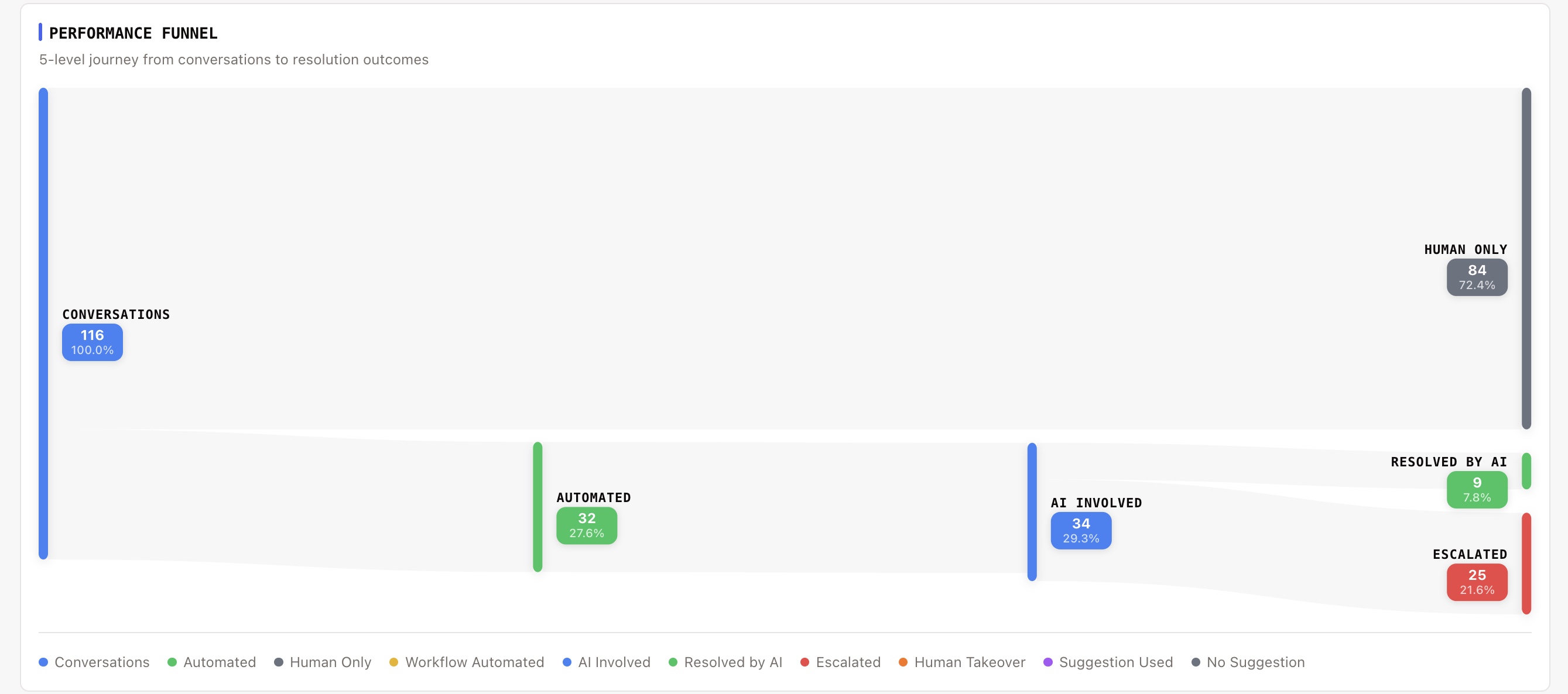
The Automation Funnel is a visual flow diagram (Sankey chart) that shows how tickets move through the automation pipeline. It helps you understand at each stage how many tickets were automated vs. handled by humans.
The flow works like this:
Total Resolved Tickets splits into:
Automated — Tickets where AI or a workflow was involved
Not Automated (Human Only) — Tickets resolved entirely by human agents
Automated splits into:
Workflow — Resolved by automation flows
AI Involved — AI generated suggestions or sent messages
AI Involved splits into:
Resolved by AI — Fully handled by AI, no human involvement
Escalated — AI was involved but the conversation was escalated to a human
Human Takeover — AI was involved, then a human agent took over
Human Takeover splits into:
Suggestion Used — The human agent used AI suggestions when resolving
No Suggestion Used — The human agent resolved without using AI suggestions
Each node in the funnel shows the ticket count that passed through that stage.
KPI Trend Charts
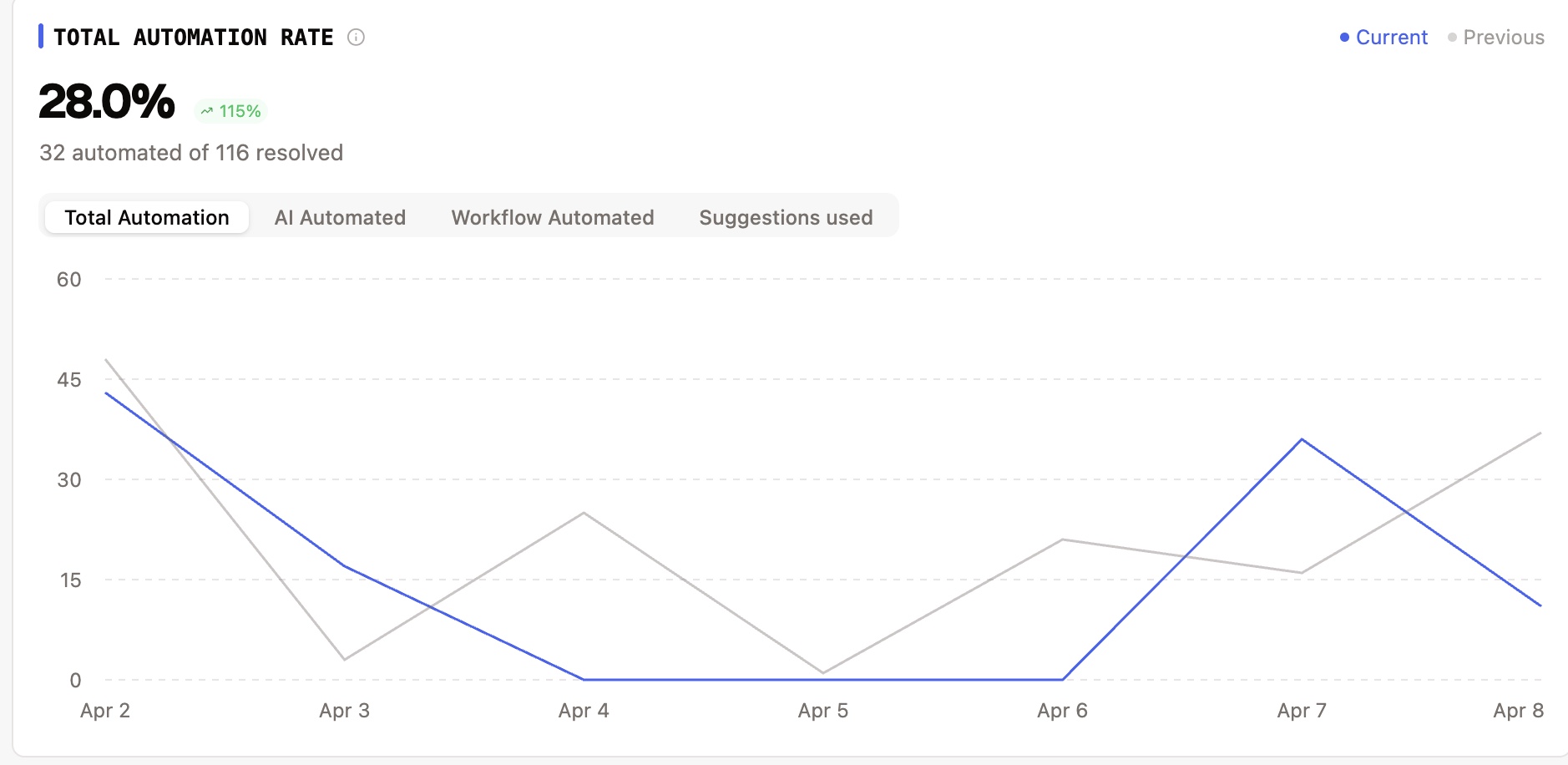
Four tabbed time-series charts track automation metrics over time. Select a tab to switch between metrics:
Tab | Metric | How it's calculated |
|---|---|---|
Total | Total Automation Rate | (All automated tickets / Total resolved) x 100 |
AI | AI Resolution Rate | (AI-handled tickets / Total resolved) x 100 |
Workflow | Workflow Automation Rate | (Workflow-resolved tickets / Total resolved) x 100 |
Suggestions | Suggestion Acceptance Rate | (Suggestions used / Suggestions offered) x 100 |
Each chart shows the current period with a trend comparison line for the previous period.
Topic Analysis
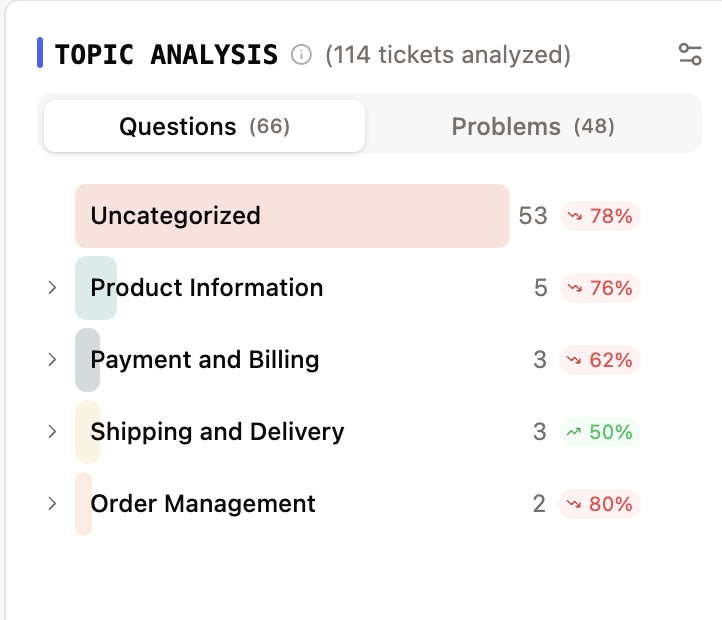
Topic Analysis shows what your customers are asking about, automatically categorized by AI.
What it shows | Categorization of customer inquiries analyzed by AI |
Topic types | Question — Customer asking for information. Problem — Customer reporting an issue. |
Hierarchy | Topics are classified in a 3-level hierarchy (Level 1 > Level 2 > Level 3) for progressively detailed categorization |
Trend | Each topic count compared to the previous period |
Example: A Level 1 topic might be "Orders", Level 2 might be "Order Status", and Level 3 might be "Delayed Shipment".
Note: Topic analysis runs on every resolved ticket, not just AI-involved ones. When a ticket is resolved, its conversation is analyzed and categorized into the topic hierarchy automatically.
Workflow Drilldown
This section shows the performance of your individual automated workflows:
Metric | Description |
|---|---|
Tickets Processed | Total tickets that entered the workflow |
Completed | Tickets that successfully completed the workflow |
Pending | Tickets currently in the workflow (active or waiting for input) |
Failed | Tickets where the workflow encountered an error |
The table shows the top 10 workflows by volume.
Key Definitions
These definitions explain how the AI flags are determined. Understanding them helps you interpret the numbers correctly.
AI Handled
A ticket is considered AI Handled when all of the following are true:
The ticket is resolved or closed
AI sent at least one message on the ticket
No human agent sent a message
No workflow was involved in resolving the ticket
AI Escalated
A ticket is considered AI Escalated when:
The AI explicitly flagged the ticket with an escalation reason (e.g., AI determined it needed human review), or
The AI escalation flag was set during processing
AI Involved
A ticket has AI Involvement when:
AI suggestions were offered and/or used, or AI sent messages on the ticket
And the ticket was not handled solely by a workflow
This means a ticket can be "AI Involved" even if a human ultimately resolved it — as long as AI participated in some way.
Workflow Automated
A ticket is considered Workflow Automated when:
The ticket is resolved or closed
At least one workflow completed successfully on the ticket
No human agent sent a message
What's Next?
Ticket Performance - Status — Deep dive into ticket statuses and resolution metrics.
Agent Performance Dashboard — See how individual agents are performing.
How Metrics Are Calculated — Detailed breakdown of how each metric is derived.