> ## Documentation Index
> Fetch the complete documentation index at: https://docs.armin.cx/llms.txt
> Use this file to discover all available pages before exploring further.
# Chatarmin
> Leit ChatArmin-WhatsApp-Gespräche nach Chatarmin CX weiter.
Die Chatarmin-Integration verbindet ChatArmin mit Chatarmin CX, damit WhatsApp-Gespräche als Tickets erscheinen können.
## Chatarmin einrichten
Geh zu **Integrationen** und wähle **Chatarmin**.
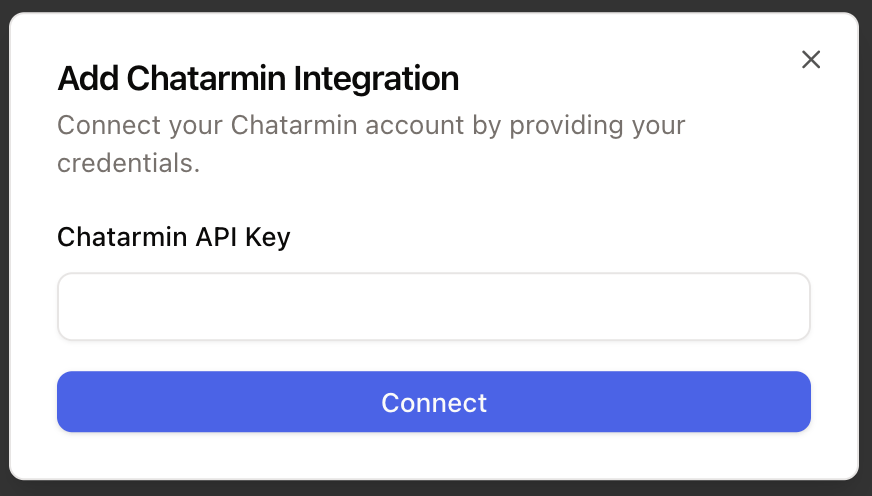
Klick auf **Verbinden**, füg ein Konto hinzu, füg deinen ChatArmin-API-Schlüssel ein und verbinde ihn.
 ## Nächster Schritt
Nachdem die Integration verbunden ist, erstelle einen WhatsApp-Kanal und einen ChatArmin-Weiterleitungsflow.
Mehr dazu unter [WhatsApp einrichten](/de/channels/whatsapp/whatsapp).
## Nächster Schritt
Nachdem die Integration verbunden ist, erstelle einen WhatsApp-Kanal und einen ChatArmin-Weiterleitungsflow.
Mehr dazu unter [WhatsApp einrichten](/de/channels/whatsapp/whatsapp).