> ## Documentation Index
> Fetch the complete documentation index at: https://docs.armin.cx/llms.txt
> Use this file to discover all available pages before exploring further.
# Use workflows with Classic AI
> Maintain Classic AI triggers for legacy workflow automations.
Classic AI can trigger legacy workflows when a customer request matches the workflow's AI prompt.
Fully move existing Classic AI and workflow automation to AI Agents over time. Follow the [migration guide](/ai-agents/migrate-from-classic-ai) to replace one use case, prove it in a controlled rollout, and turn off overlapping triggers before expanding. [Create an AI Agent](/ai-agents/getting-started), and use the [Classic AI agent list](https://armin.cx/app/_/ai/agents) or [Workflows](https://armin.cx/app/_/workflows) only during migration or for necessary maintenance.
Ongoing work on the ticket continues first. A matching legacy AI-guided workflow may start before a new AI Agent. Once an AI Agent owns the conversation, Classic AI backs off. See [Routing and ownership](/ai-agents/routing-and-ownership) for the exact behavior.
## Requirements
Before Classic AI can trigger a workflow:
* the workflow must be published
* the workflow must be active
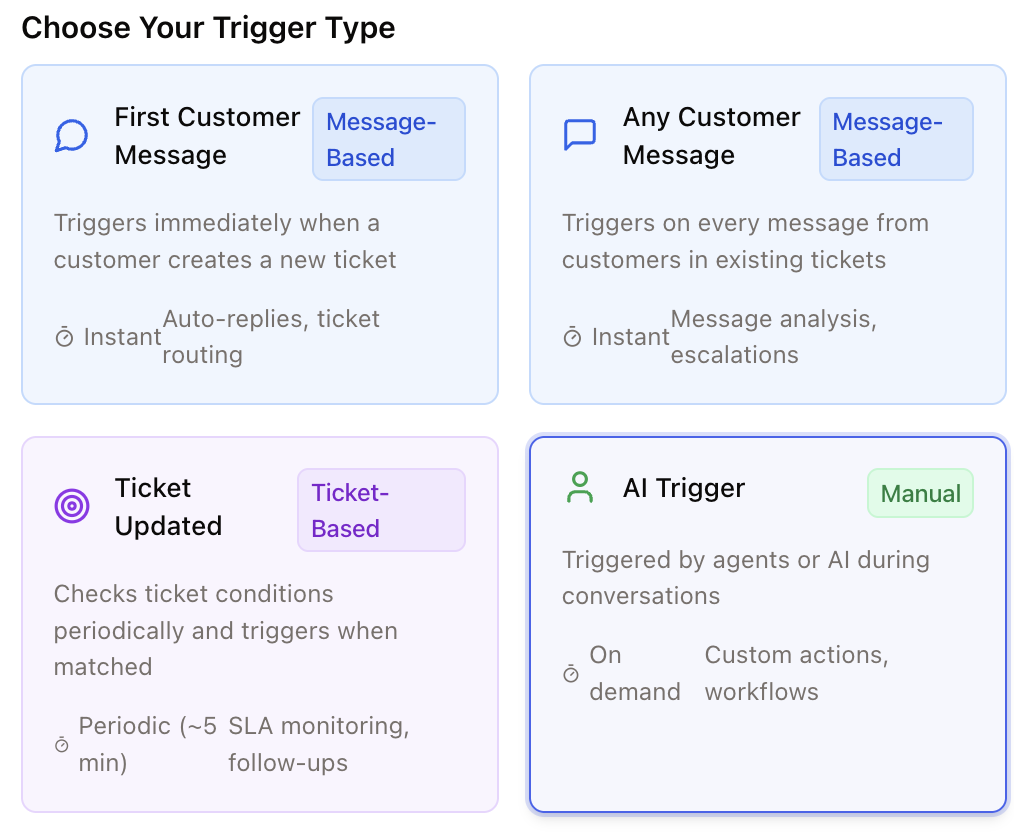
* the trigger node must use an AI trigger
* the AI prompt must describe when the workflow should run
* the workflow should be tested with realistic ticket examples
 ## Write a good AI trigger prompt
Tell the AI exactly when to trigger the workflow and when not to trigger it.
```text theme={null}
Only trigger when a customer asks about the order status or where their order is.
This includes messages where the customer wants to know whether the order has been processed,
shipped, or when it will arrive.
Trigger examples:
- "Where is my order?"
- "What is the status of my order?"
- "Has my order already been shipped?"
- "When will I receive my delivery?"
Do not trigger when the customer reports a missing or damaged item, asks about a return or refund,
or wants to change or cancel an order. Those cases are handled by other workflows.
```
## Best practices
* Include positive and negative examples.
* Keep each workflow focused on one task.
* Test before publishing.
* Use approval mode for sensitive actions.
Learn more in [Workflows](/workflows/intro).
For new automation, see the [AI Agents overview](/ai-agents/intro).
## Write a good AI trigger prompt
Tell the AI exactly when to trigger the workflow and when not to trigger it.
```text theme={null}
Only trigger when a customer asks about the order status or where their order is.
This includes messages where the customer wants to know whether the order has been processed,
shipped, or when it will arrive.
Trigger examples:
- "Where is my order?"
- "What is the status of my order?"
- "Has my order already been shipped?"
- "When will I receive my delivery?"
Do not trigger when the customer reports a missing or damaged item, asks about a return or refund,
or wants to change or cancel an order. Those cases are handled by other workflows.
```
## Best practices
* Include positive and negative examples.
* Keep each workflow focused on one task.
* Test before publishing.
* Use approval mode for sensitive actions.
Learn more in [Workflows](/workflows/intro).
For new automation, see the [AI Agents overview](/ai-agents/intro).